.png)

“Insights teams are feeling the pressure from every direction.”
~ Every intro sentence to every Research Tech blog, presentation, and demo call since 2023
And we understand why. Leadership wants rapid answers and more confidence in every decision. They ask insights teams to do more with the research they already have, and now with AI integrating itself into nearly every part of the workflow, stakeholders expect analysis be somehow faster, cleaner, and more scalable all at once.
But any researcher pushing out good work knows speed alone isn't the goal.
The real challenge is moving faster without sacrificing what makes research valuable in the first place: rigor, repeatability, and confidence. If analysis feels opaque, quality is hard to audit, or every project requires teams to start from scratch, faster workflows can create just as many problems as they solve.
That’s why we’ve revamped Knit’s Data Explorer to make your data even richer and diving into it more immersive.
We designed it around how researchers actually work: helping teams field faster, explore data more intuitively, guide qual analysis with more structure, and bring past research back into use while keeping researcher judgment at the center of the workflow.
TLDR:
What’s new in Data Explorer?
Knit’s updated Data Explorer gives your team faster and more flexible ways to navigate research without giving up control.
Here’s what’s new:
- A fresher Data Exploration experience
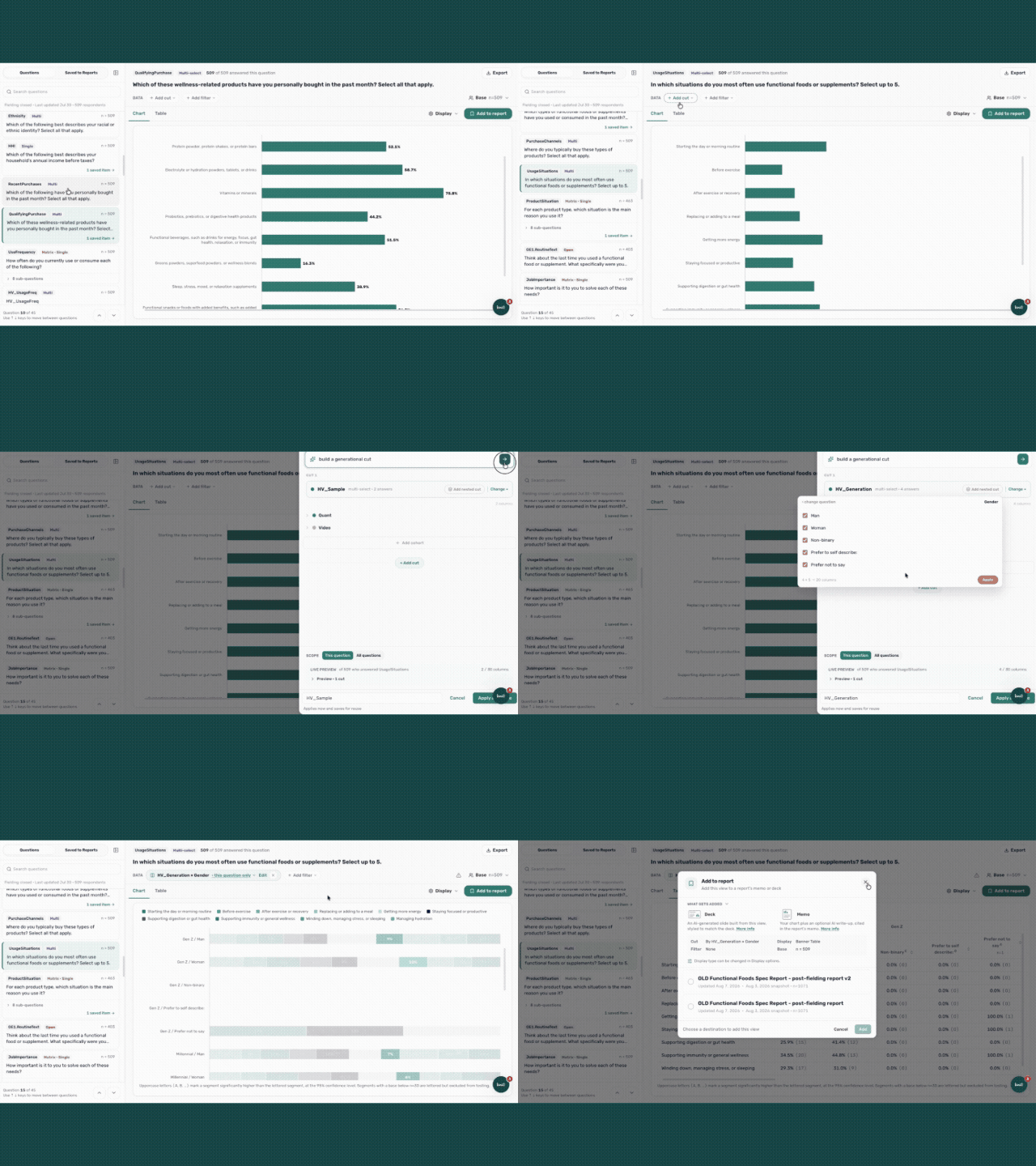
- Build cuts and filters more intuitively, toggle chart views, switch between counts and percentages, and add charts to reports as you move through analysis.
- Search Your Data
- Use the search feature directly to find the answer you need. Get an answer that's linked back to the data and add findings to a report with a single click.
- Continuous Respondent Qualification
- See completes as they come in, with data quality checks you can trust so your team can field faster while maintaining confidence in data integrity.
- Enhanced Qual Analysis
- Apply reusable qualitative theme trees to define your coding framework, re-run analysis against the same structure, and make qual outputs more consistent and defensible.
- AI-Native Data Upload
- Bring eligible past studies into Knit to generate a fresh AI-native report and Data Explorer view, making completed research easier to revisit, reanalyze, and reuse.
Want to see it in action? If you’re a current customer, reach out to your Knit point of contact to talk through how they can support your next study. If you’re not a current customer… You’re going to want to check out a demo. 👉 Book one here
A fresher Data Exploration experience
Data exploration is where raw results start to become a story. However, clunky tools, exports, manual charting, or constant back-and-forth between platforms frequently bog that work down.
Our refreshed Data Explorer makes data exploration less of an endeavor and more of an intuitive experience. Researchers can move through survey questions, create cuts and filters, compare results, adjust chart views, and prepare visuals for reports without leaving the workflow.
That means less time stitching data together and more time understanding what the results actually mean.
With the new experience, teams can:
- Build cuts and filters more intuitively
- Toggle between counts and percentages
- Switch chart views more easily
- Add charts to reports as they move through analysis
The result is a more flexible analysis experience that helps researchers show the data in the way the story needs to be told.
Search Your Data
Finding a specific answer in your data shouldn't require rebuilding the entire analysis.
With the search feature in the new Data Explorer, you can jump straight to what you're looking for — no need to manually walk through every question, cut, and filter to surface a single insight.
Ask a question in plain language and get an answer that's linked directly back to the underlying data. That means you can trace any finding to its source with confidence, making it easy to validate results or explain them to stakeholders.
When you find something worth sharing, add it to a report with a single click without re-creating charts or copying numbers into a deck.
With Search Your Data, you can:
- Quickly search for an insight
- Get answers linked back to the source data
- Add findings to reports with one click
The result is less time hunting through results and more time acting on what you find.
Continuous Respondent Qualification
Speed is only useful if the data is trustworthy.
Knit’s Continuous Respondent Qualification allows you to see completes as responses come in, giving teams earlier visibility into data quality while fielding is still in progress.
This way, you don’t have to wait until fielding concludes to understand what may need review. Instead, Knit’s quality checks help your team maintain confidence in dataset integrity.
Faster fielding doesn’t have to come at the cost of rigor. Continuous quality checks help teams move faster while still protecting research integrity.
Enhanced Qual Analysis
Qualitative analysis is where research judgment matters most. It’s also where maintaining consistency becomes particularly difficult to maintain, especially across projects, teams, or repeat studies.
With Enhanced Qual Analysis, Knit gives researchers more control over the framework used to analyze open-ended and qualitative responses. You can bring your own qualitative theme trees, define them up front or refine them after a first pass, and re-run coding against the same framework for more consistent outputs.
That means qual analysis becomes more steerable, more repeatable, and easier to explain.
Instead of relying on a black-box interpretation, you can apply your own structure and make the coding process more defensible.
With this update, insights teams can:
- Define qualitative theme trees up front
- Refine theme trees after an initial pass
- Re-run coding against the same framework
- Reuse theme trees across projects
- Create more consistent qual outputs
- Use audio-only question types when video is not the right fit
Audio-only questions also give teams another way to collect richer feedback while reducing friction for respondents. For studies where video may feel too heavy or limit feasibility, audio-only can offer another path to qualitative depth.
AI-Native Data Upload
Research far too often loses its value after you ship the final report. Many teams like yours have years of useful studies sitting in old decks, spreadsheets, and folders. That data still holds value, but it becomes difficult to revisit, reframe, or build on when new priorities emerge.
AI-Native Data Upload gives completed research a second life inside Knit.
With Data Upload, you can bring existing research to Knit for instant reanalysis, a new AI-native report, and a Data Explorer view. Past work evolves from a static artifact to active intelligence your team can revisit and build on.
For teams with existing research libraries, this creates a new way to get more ROI from already-funded work.
With Data Upload, teams can:
- Bring eligible past studies into Knit
- Generate a fresh AI-native report
- Create a Data Explorer view for exploration
- Reanalyze completed research through a new lens
- Reuse prior studies instead of starting from scratch
The question-by-question experience is still here
This release isn’t about replacing the way researchers work. It’s about making that work faster, more intuitive, and more connected.
The question-by-question Data Explorer experience Knit customers know is still available. These updates simply give teams more flexible ways to explore, trust, and shape their research in Knit — with researcher judgment still in the driver’s seat.
That’s the bigger shift behind this release. AI can help clear that tedious manual work, but your expertise is still necessary to guide the analysis, understand the data, and stand behind the story.
The new Data Explorer is built for that reality.
{{cta-1}}
If you’re a current customer, reach out to your Knit point of contact to talk through how they can support your next study. If you’re not a current customer… You’re going to want to check out a demo.

.svg)
.svg)
.svg)

Get the latest research insights and product updates from Knit straight to your inbox.


